我需要写一个下拉刷新,我重写了BaseAdapter,需要在白色空白处显示一个下拉刷新
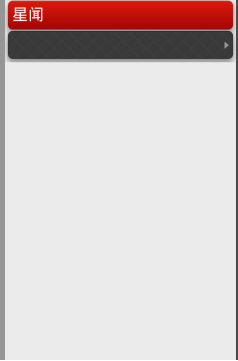 ,但是报错
,但是报错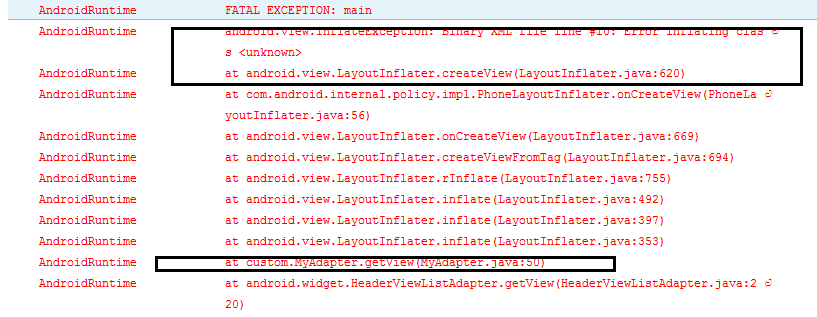 ,代码如下:
package com.example.xinwen;

import java.util.ArrayList;
import java.util.HashMap;

import android.app.Activity;
import android.os.AsyncTask;
import android.os.Bundle;
import android.text.format.DateUtils;
import android.util.Log;
import android.widget.ListView;

import com.handmark.pulltorefresh.library.ILoadingLayout;
import com.handmark.pulltorefresh.library.PullToRefreshBase;
import com.handmark.pulltorefresh.library.PullToRefreshBase.OnRefreshListener;
import com.handmark.pulltorefresh.library.PullToRefreshListView;

public class MainActivity extends Activity {

	private PullToRefreshListView mPullRefreshListView;
	MyAdapter adapter=null;
	private ArrayList<HashMap<String, String>> listItem;
    @Override
    protected void onCreate(Bundle savedInstanceState) {
        super.onCreate(savedInstanceState);
        setContentView(R.layout.activity_main);

        listItem = new ArrayList<HashMap<String,String>>();
		mPullRefreshListView = (PullToRefreshListView) findViewById(R.id.news_refresh_list);
		mPullRefreshListView.setOnRefreshListener(new OnRefreshListener<ListView>() {
			public void onRefresh(PullToRefreshBase<ListView> refreshView) {
				String label = DateUtils.formatDateTime(getApplicationContext(), System.currentTimeMillis(),
                        DateUtils.FORMAT_SHOW_TIME | DateUtils.FORMAT_SHOW_DATE | DateUtils.FORMAT_ABBREV_ALL);
						// 设置下拉的属性
				ILoadingLayout startLabels = mPullRefreshListView.getLoadingLayoutProxy();
				startLabels.setPullLabel("下拉刷新");// 刚下拉时,显示的提示
				startLabels.setRefreshingLabel("正在加载");// 刷新时
				startLabels.setReleaseLabel("松开即刷新");// 下来达到一定距离时,显示的提示
			    startLabels.setLastUpdatedLabel(label);
			    //执行任务
			    new GetDataTask().execute();
					}
				});
		listItem = getdata();
		adapter = new MyAdapter(listItem,this);
		//设置下拉listview的适配器
		ListView actualListView = mPullRefreshListView.getRefreshableView();
        actualListView.setAdapter(adapter);

    }
    private ArrayList<HashMap<String, String>> getdata(){
		ArrayList<HashMap<String, String>> list = new ArrayList<HashMap<String,String>>();
		for(int i = 0 ; i < 10 ; i++){
			HashMap<String, String> hashMap = new HashMap<String, String>();
			hashMap.put("newslist_item_title", "星闻客户端马上就要发布啦"+ i);
			hashMap.put("newslist_item_digest", "我是星闻客户端,以后就由我来播报新闻啦");
			hashMap.put("newslist_item_source", "新浪");
//			hashMap.put("newslist_item_comment", "50");
			list.add(hashMap);
		}
		return list;
	}
    private class GetDataTask extends AsyncTask<Void, Void, HashMap<String, String>>{
		@Override
		protected HashMap<String, String> doInBackground(Void... params) {

			try {
				Thread.sleep(1000);
			} catch (Exception e) {
				Log.i("mis", "出错了");
				e.printStackTrace();
			}
			HashMap<String, String> map = new HashMap<String, String>();
			map.put("newslist_item_title", "新的星闻客户端");
			map.put("newslist_item_digest", "我是刷新过的新闻客户端啦啦啦啦啦");
			map.put("newslist_item_source", "腾讯");
//			map.put("newslist_item_comment", "100");
			System.out.println("zhixingle");

			return map;
		}
		@Override
		protected void onPostExecute(HashMap<String, String> result) {

			 try {
	                listItem.add(result);
	                System.out.println("tianjiale");
	                //通知程序数据集已经改变,如果不做通知,那么将不会刷新mListItems的集合
	                adapter.notifyDataSetChanged();
	                // Call onRefreshComplete when the list has been refreshed.
	                mPullRefreshListView.onRefreshComplete();
	            } catch (Exception e) {
	                // TODO: handle exception
	                setTitle(e.getMessage());
	            }
			super.onPostExecute(result);
		}
	}

}
重写的BaseAdapter,
package custom;

import java.util.ArrayList;
import java.util.HashMap;

import android.content.Context;
import android.view.LayoutInflater;
import android.view.View;
import android.view.ViewGroup;
import android.widget.BaseAdapter;
import android.widget.TextView;

import com.xingwen.news.R;

public class MyAdapter extends BaseAdapter {

	private ArrayList<HashMap<String, String>> list ;
	private Context context;


	public MyAdapter(ArrayList<HashMap<String, String>> list, Context context) {
		super();
		this.list = list;
		this.context = context;
	}

	@Override
	public int getCount() {
		// TODO Auto-generated method stub
		return list.size();
	}

	@Override
	public Object getItem(int position) {
		// TODO Auto-generated method stub
		return null;
	}

	@Override
	public long getItemId(int position) {
		// TODO Auto-generated method stub
		return 0;
	}

	@Override
	public View getView(int position, View convertView, ViewGroup parent) {

		LayoutInflater inflater = (LayoutInflater) context.getSystemService(Context.LAYOUT_INFLATER_SERVICE);
		convertView =  inflater.inflate(R.layout.newslist_item, null);
		TextView title = (TextView) convertView.findViewById(R.id.newslist_item_title);
		title.setText((String)list.get(position).get("newslist_item_title"));
		TextView digest = (TextView) convertView.findViewById(R.id.newslist_item_digest);
		digest.setText((String)list.get(position).get("newslist_item_digest"));
		TextView source = (TextView) convertView.findViewById(R.id.newslist_item_source);
		source.setText((String)list.get(position).get("newslist_item_source"));

		return convertView;
	}

}
但是,我单独把这一块新建了一个项目,就可以成功的显示
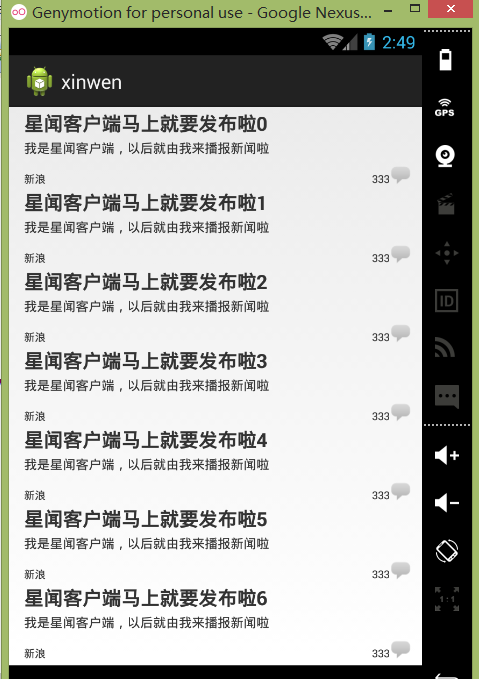 求大神帮忙,问题出在哪里?
------解决思路----------------------
xml文件有一处出错
------解决思路----------------------
xml文件,第10行有错。