一、先了解几个属性:
1.布局
1) android:orientation="vertical" 垂直布局
2)android:orientation="horizontal" 水平布局
2.控件内容高和宽布局
1) android:layout_width="match_parent" ,布满整个屏幕. [匹配父窗口]
2)android:layout_height="wrap_content",布局元素将根据内容更改大小.[内容包括]
3.布局比例
所有的视图都有一个layout_weight值,默认为零,意思是需要显示 多大的视图就占据多大的屏幕空 间。若赋一个高于零的值,则将父视 图中的可用空间分割,分割大小具体取决于每一个视图的layout_weight 值以及该值在当前屏幕布局的整体 layout_weight值和在其它视图屏幕布 局的layout_weight值中所占的比率而定。
二、下面两个例子实现:
1)三个按钮横向摆放

<LinearLayout android:layout_width="match_parent" android:layout_height="wrap_content" android:orientation="horizontal" > <Button android:layout_width="match_parent" android:layout_height="wrap_content" android:layout_weight="1" android:text="mc" /> <Button android:layout_width="match_parent" android:layout_height="wrap_content" android:layout_weight="1" android:text="m+" /> <Button android:layout_width="match_parent" android:layout_height="wrap_content" android:layout_weight="1" android:text="m-" /> <Button android:layout_width="match_parent" android:layout_height="wrap_content" android:layout_weight="1" android:text="mr" /> </LinearLayout>借用layout_weight使三个按钮摆放占用比例一致.
二、两层按钮:第一层三个,第二次2个
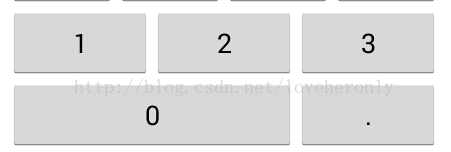
<LinearLayout android:layout_width="match_parent" android:layout_height="wrap_content" android:orientation="vertical" > <LinearLayout android:layout_width="match_parent" android:layout_height="wrap_content" android:layout_weight="3" android:orientation="horizontal" > <Button android:layout_width="match_parent" android:layout_height="wrap_content" android:layout_weight="1" android:text="1" /> <Button android:layout_width="match_parent" android:layout_height="wrap_content" android:layout_weight="1" android:text="2" /> <Button android:layout_width="match_parent" android:layout_height="wrap_content" android:layout_weight="1" android:text="3" /> </LinearLayout> <LinearLayout android:layout_width="match_parent" android:layout_height="wrap_content" android:layout_weight="3" android:orientation="horizontal" > <Button android:layout_width="0px" android:layout_height="wrap_content" android:layout_weight="2" android:text="0" /> <Button android:layout_width="0px" android:layout_height="wrap_content" android:layout_weight="1" android:text="." /> </LinearLayout> </LinearLayout>先用一个大层,设置权重比例都是3. 第二层的第一个按钮比例的权重又占它属于层的2/3.