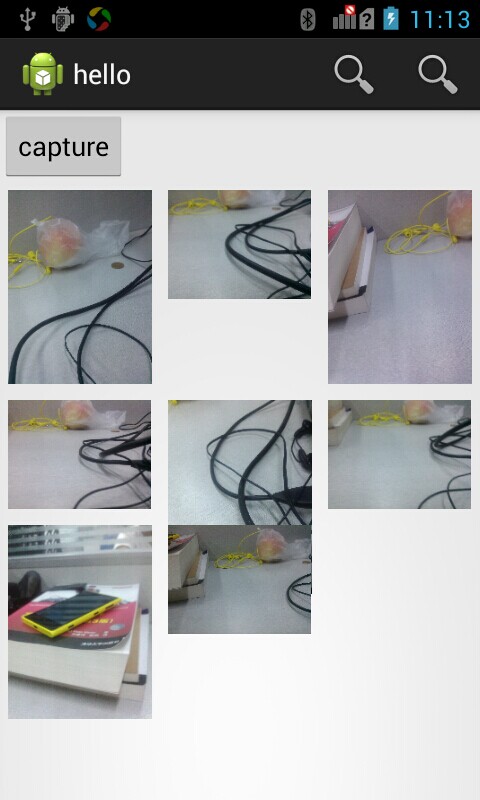
这个程序的功能是拍照,然后把缩略图显示到GridView中,较小的照片是横向拍的,大一点的是纵向拍的。
第三行中间的图片和第二行中间的图片部分重叠了,看样子是第三行的起始位置是根据第二行最后一个单元格的高度计算的。请问这个问题如何解决?
代码:
GridView的属性设置:
    <GridView
        android:id="@+id/gridView1"
        android:layout_width="match_parent"
        android:layout_height="wrap_content"
        android:numColumns="3" >
    </GridView>
拍照完成后计算缩略图,然后付给Adapter
protected void onActivityResult(int requestCode, int resultCode, Intent data) {
	if (requestCode == TAKE_IMAGE) {
		if (resultCode == Activity.RESULT_OK) {
			Bitmap img = BitmapFactory.decodeFile(currentFilePath);
			GridView gv = (GridView) findViewById(R.id.gridView1);
			int cellWidth = gv.getWidth() / gv.getNumColumns();
			float x = img.getWidth() / cellWidth;
			int thumbnailHeight = Math.round(img.getHeight() / x);
			Bitmap thumbnail = ThumbnailUtils.extractThumbnail(img,
					cellWidth, thumbnailHeight);
			ImageModel model = new ImageModel();
			model.setFilePath(currentFilePath);
			model.setThumbnail(thumbnail);
			adapter.AddItem(model);
			adapter.notifyDataSetChanged();
		}
	}
}
adapter的GetView方法:
public View getView(int arg0, View arg1, ViewGroup arg2) {
	// TODO Auto-generated method stub
	ImageView view = null;
	if (arg1 == null) {
		view = new ImageView(context);
		GridView.LayoutParams param = new GridView.LayoutParams(LayoutParams.MATCH_PARENT, LayoutParams.MATCH_PARENT);
		view.setLayoutParams(param);
		view.setScaleType(ScaleType.CENTER_INSIDE );
		view.setPadding(8, 8, 8, 8);
	} else {
		view = (ImageView) arg1;
	}
	view. setAdjustViewBounds(true);
	ImageModel model = imageList.get(arg0);
	view.setImageBitmap(model.getThumbnail());
	return view;
}
------解决方案--------------------
指定ImageView的高度和宽度,不要使用wrap_content