项目中经常碰到需要处理大图片的问题,因为android对应用分配资源的限制,如果不进行相应的处理,容易造成OOM。
Android处理大图的方法:
对于大图先获取出图片的width和height, 然后根据view的width和height, 换算出图片inSampleSize,,最后压缩生成相应的图片。
其中重要的两个参数是:
/**111 * If set to true, the decoder will return null (no bitmap), but112 * the out... fields will still be set, allowing the caller to query113 * the bitmap without having to allocate the memory for its pixels.114 */115 public boolean inJustDecodeBounds;116117 /**118 * If set to a value > 1, requests the decoder to subsample the original119 * image, returning a smaller image to save memory. The sample size is120 * the number of pixels in either dimension that correspond to a single121 * pixel in the decoded bitmap. For example, inSampleSize == 4 returns122 * an image that is 1/4 the width/height of the original, and 1/16 the123 * number of pixels. Any value <= 1 is treated the same as 1. Note: the124 * decoder uses a final value based on powers of 2, any other value will125 * be rounded down to the nearest power of 2.126 */127 public int inSampleSize;
InJustDecodeBounds能在不分配资源给图片的情况下获取图片的大小
inSampleSize计算图片的压缩比
开源项目xutils, Universal-Image-Loader和Foursquare对于大图的处理都类似的
下面是Foursquare处理大图的代码:
public class ImageUtils { private ImageUtils() { } public static void resampleImageAndSaveToNewLocation(String pathInput, String pathOutput) throws Exception { Bitmap bmp = resampleImage(pathInput, 640); OutputStream out = new FileOutputStream(pathOutput); bmp.compress(Bitmap.CompressFormat.JPEG, 90, out); } public static Bitmap resampleImage(String path, int maxDim) throws Exception { BitmapFactory.Options bfo = new BitmapFactory.Options(); bfo.inJustDecodeBounds = true; BitmapFactory.decodeFile(path, bfo); BitmapFactory.Options optsDownSample = new BitmapFactory.Options(); optsDownSample.inSampleSize = getClosestResampleSize(bfo.outWidth, bfo.outHeight, maxDim); Bitmap bmpt = BitmapFactory.decodeFile(path, optsDownSample); Matrix m = new Matrix(); if (bmpt.getWidth() > maxDim || bmpt.getHeight() > maxDim) { BitmapFactory.Options optsScale = getResampling(bmpt.getWidth(), bmpt.getHeight(), maxDim); m.postScale((float)optsScale.outWidth / (float)bmpt.getWidth(), (float)optsScale.outHeight / (float)bmpt.getHeight()); } int sdk = new Integer(Build.VERSION.SDK).intValue(); if (sdk > 4) { int rotation = ExifUtils.getExifRotation(path); if (rotation != 0) { m.postRotate(rotation); } } return Bitmap.createBitmap(bmpt, 0, 0, bmpt.getWidth(), bmpt.getHeight(), m, true); } private static BitmapFactory.Options getResampling(int cx, int cy, int max) { float scaleVal = 1.0f; BitmapFactory.Options bfo = new BitmapFactory.Options(); if (cx > cy) { scaleVal = (float)max / (float)cx; } else if (cy > cx) { scaleVal = (float)max / (float)cy; } else { scaleVal = (float)max / (float)cx; } bfo.outWidth = (int)(cx * scaleVal + 0.5f); bfo.outHeight = (int)(cy * scaleVal + 0.5f); return bfo; } private static int getClosestResampleSize(int cx, int cy, int maxDim) { int max = Math.max(cx, cy); int resample = 1; for (resample = 1; resample < Integer.MAX_VALUE; resample++) { if (resample * maxDim > max) { resample--; break; } } if (resample > 0) { return resample; } return 1; } public static BitmapFactory.Options getBitmapDims(String path) throws Exception { BitmapFactory.Options bfo = new BitmapFactory.Options(); bfo.inJustDecodeBounds = true; BitmapFactory.decodeFile(path, bfo); return bfo; }}还有一个问题需要纠正:
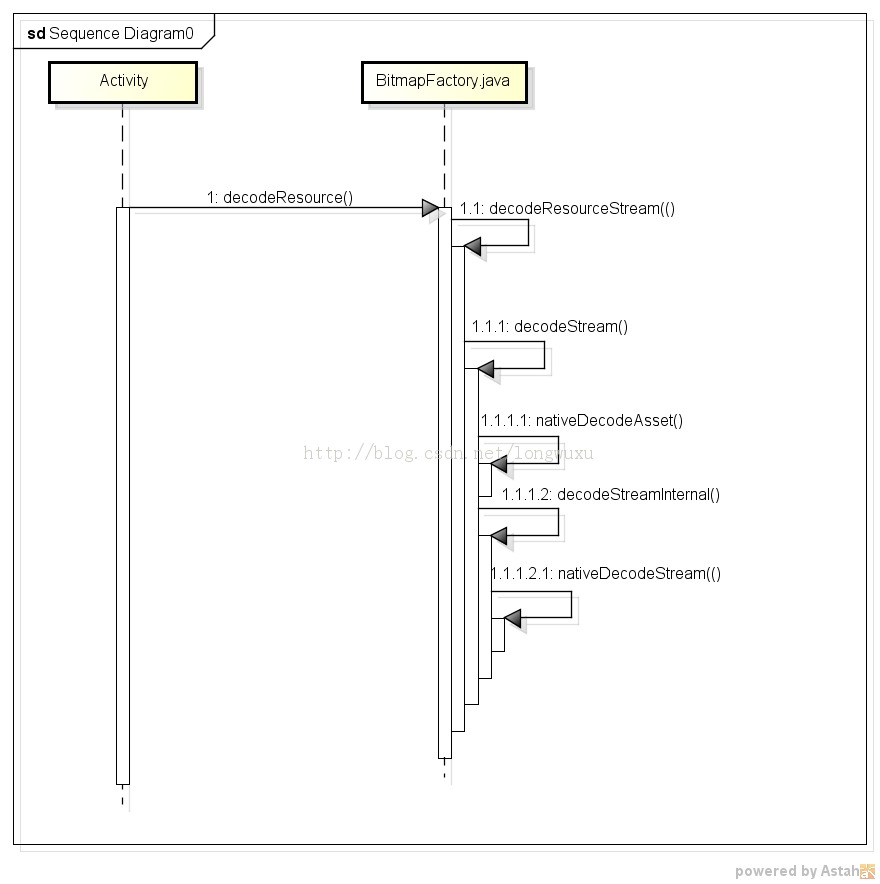
看了几篇关于处理大图的文章都说不要调用BitmapFactory.decodeResource这个函数,因为这个函数在完成decode后,最终都是通过java层的createBitmap来完成的,需要消耗更多内存。
我看了BitmapFactory的源码发现上面那个分析是错误的,decodeResource最终也是调用Jni去获取图片。请看下面时序图。