有很多时候都需要在不同的Activity之间传递数据。
实现方法有很多,可以用Bundle来传递,也可以用给Intent用putExtra传递附加参数。
当然也可以传递自定义类的对象。为了让自定义类可以在Activity之间传递,必须符合一些条件。常用的方法是自定义类实现Parcelable接口或Serializable接口。Android中建议实现Parcelable。
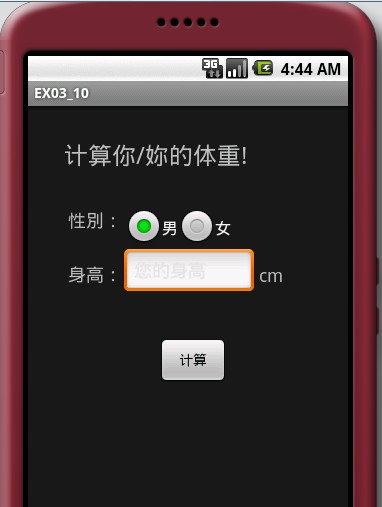
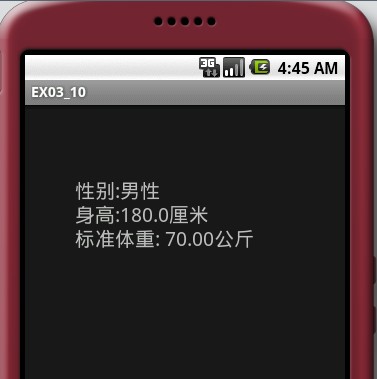
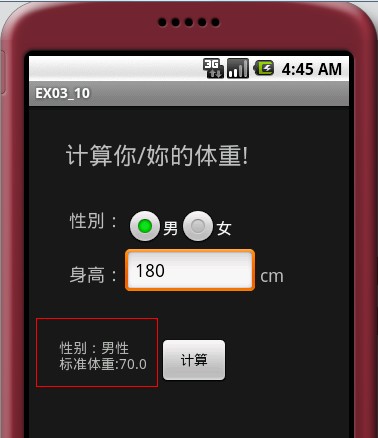
下面例子中两种方法都有例子。
传递Parcelable过去,再传递Serializable回来。
WeightParcelable.java
import android.os.Parcel;import android.os.Parcelable;public class WeightParcelable implements Parcelable { private String sex; private double height;//必须的空构造器,因为下面有一个私有的构造器,否则不能new对象 public WeightParcelable() { } public String getSex() { return sex; } public void setSex(String sex) { this.sex = sex; } public double getHeight() { return height; } public void setHeight(double height) { this.height = height; } @Override public int describeContents() { return 0; }//需要覆盖的方法 @Override public void writeToParcel(Parcel out, int flags) { out.writeString(sex); out.writeDouble(height); }//关键的事情 public static final Parcelable.Creator<WeightParcelable> CREATOR = new Parcelable.Creator<WeightParcelable>() { public WeightParcelable createFromParcel(Parcel in) { return new WeightParcelable(in); } public WeightParcelable[] newArray(int size) { return new WeightParcelable[size]; } };// private WeightParcelable(Parcel in) { sex = in.readString(); height = in.readDouble(); }}HeightSerializable.java
import java.io.Serializable;public class HeightSerializable implements Serializable { private static final long serialVersionUID = 8502706820090766507L; private String sex; private double weight; public String getSex() { return sex; } public void setSex(String sex) { this.sex = sex; } public double getWeight() { return weight; } public void setWeight(double weight) { this.weight = weight; }}EX03_10.java
import android.app.Activity;import android.content.Intent;import android.os.Bundle;import android.util.Log;import android.view.View;import android.widget.Button;import android.widget.EditText;import android.widget.RadioButton;import android.widget.TextView;public class EX03_10 extends Activity { /** Called when the activity is first created. */ public static final String parcelableKey = "irdc.ex03_10.parcelableKey"; public static final String seralizableKey = "irdc.ex03_10.seralizableKey"; private static final String TAG = "EX03_10"; @Override public void onCreate(Bundle savedInstanceState) { super.onCreate(savedInstanceState); setContentView(R.layout.main); Button b1 = (Button) findViewById(R.id.button1); b1.setOnClickListener(new Button.OnClickListener() { public void onClick(View v) { EditText et = (EditText) findViewById(R.id.height); double height = Double.parseDouble(et.getText().toString()); String sex = ""; RadioButton rb1 = (RadioButton) findViewById(R.id.sex1); if (rb1.isChecked()) { sex = "M"; } else { sex = "F"; } Intent intent = new Intent(); intent.setClass(EX03_10.this, EX03_10_1.class); Bundle bundle = new Bundle(); WeightParcelable wp = new WeightParcelable(); wp.setSex(sex); wp.setHeight((int) height); bundle.putParcelable(parcelableKey, wp); intent.putExtras(bundle);//注意这里 startActivityForResult(intent, 1); } }); }//这个是关键 @Override protected void onActivityResult(int requestCode, int resultCode, Intent data) { Log.d(TAG, "onActivityResult requestCode=" + requestCode + " resultCode= " + resultCode + " data == null[" + (data == null) + "]"); super.onActivityResult(requestCode, resultCode, data); if (requestCode == 1) { if (resultCode == RESULT_OK) { try { HeightSerializable hs = (HeightSerializable) data .getSerializableExtra(seralizableKey); TextView textView4 = (TextView) findViewById(R.id.text4); textView4.setText("性别:" + hs.getSex() + "\n标准体重:" + hs.getWeight()); } catch (Exception e) { e.printStackTrace(); } } } }}EX03_10_1.java
import java.text.DecimalFormat;import java.text.NumberFormat;import android.app.Activity;import android.content.Intent;import android.os.Bundle;import android.util.Log;import android.widget.TextView;public class EX03_10_1 extends Activity { private static final String TAG = "EX03_10_1"; @Override public void onCreate(Bundle savedInstanceState) { super.onCreate(savedInstanceState); setContentView(R.layout.myalyout); WeightParcelable wp = (WeightParcelable) getIntent() .getParcelableExtra(EX03_10.parcelableKey); String sex = wp.getSex(); double height = wp.getHeight(); String sexText = ""; if (sex.equals("M")) { sexText = "男性"; } else { sexText = "女性"; } String weight = this.getWeight(sex, height); TextView tv1 = (TextView) findViewById(R.id.text1); tv1.setText("性别:" + sexText + "\n身高:" + height + "厘米\n标准体重: " + weight + "公斤"); // 返回对象 Intent data = new Intent(); HeightSerializable hs = new HeightSerializable(); hs.setSex(sexText); hs.setWeight(Double.valueOf(weight)); data.putExtra(EX03_10.seralizableKey, hs);//从这里返回对象 setResult(RESULT_OK, data); } private String format(double num) { NumberFormat formatter = new DecimalFormat("0.00"); String s = formatter.format(num); return s; } private String getWeight(String sex, double height) { String weight = ""; if (sex.equals("M")) { weight = format((height - 80) * 0.7); } else { weight = format((height - 70) * 0.6); } return weight; }} 1 楼 windloverain 2010-12-01
不错,学习了,一会试试。
2 楼 whao189 2011-05-19
我有个问题。。想 请教一下。。
是这样的
@Override
public void writeToParcel(Parcel out, int flags) {
out.writeString(sex);
out.writeDouble(height);
}
private WeightParcelable(Parcel in) {
sex = in.readString();
height = in.readDouble();
}
这个地方如果 sex height 的类型 都是一样 的 加入都是string 怎么 处理呢??
你在readString 的 时候 Parcel会帮你 自动的 比对数据么?
希望楼主能指点一二!
是这样的
@Override
public void writeToParcel(Parcel out, int flags) {
out.writeString(sex);
out.writeDouble(height);
}
private WeightParcelable(Parcel in) {
sex = in.readString();
height = in.readDouble();
}
这个地方如果 sex height 的类型 都是一样 的 加入都是string 怎么 处理呢??
你在readString 的 时候 Parcel会帮你 自动的 比对数据么?
希望楼主能指点一二!
3 楼 GhostFromheaven 2011-05-21
whao189 写道
我有个问题。。想 请教一下。。
是这样的
@Override
public void writeToParcel(Parcel out, int flags) {
out.writeString(sex);
out.writeDouble(height);
}
private WeightParcelable(Parcel in) {
sex = in.readString();
height = in.readDouble();
}
这个地方如果 sex height 的类型 都是一样 的 加入都是string 怎么 处理呢??
你在readString 的 时候 Parcel会帮你 自动的 比对数据么?
希望楼主能指点一二!
是这样的
@Override
public void writeToParcel(Parcel out, int flags) {
out.writeString(sex);
out.writeDouble(height);
}
private WeightParcelable(Parcel in) {
sex = in.readString();
height = in.readDouble();
}
这个地方如果 sex height 的类型 都是一样 的 加入都是string 怎么 处理呢??
你在readString 的 时候 Parcel会帮你 自动的 比对数据么?
希望楼主能指点一二!
可以都加入String.其实它内部是用map实现的,是key-value对。