学习android的时候感觉里面的Toast非常的方便,既可以清晰的提示用户当前操作的执行结果,又不会打断程序的正常运行,感觉在web里面加入这样一个功能也不错。
时间仓促,稍微写了一个简单的:
/** * 模仿android里面的Toast效果,主要是用于在不打断程序正常执行的情况下显示提示数据 * @param config * @return */var Toast = function(config){ this.context = config.context==null?$('body'):config.context;//上下文 this.message = config.message;//显示内容 this.time = config.time==null?3000:config.time;//持续时间 this.left = config.left;//距容器左边的距离 this.top = config.top;//距容器上方的距离 this.init();}var msgEntity;Toast.prototype = { //初始化显示的位置内容等 init : function(){ $("#toastMessage").remove(); //设置消息体 var msgDIV = new Array(); msgDIV.push('<div id="toastMessage">'); msgDIV.push('<span>'+this.message+'</span>'); msgDIV.push('</div>'); msgEntity = $(msgDIV.join('')).appendTo(this.context); //设置消息样式 var left = this.left == null ? this.context.width()/2-msgEntity.find('span').width()/2 : this.left; var top = this.top == null ? '20px' : this.top; msgEntity.css({position:'absolute',top:top,'z-index':'99',left:left,'background-color':'black',color:'white','font-size':'18px',padding:'10px',margin:'10px'}); msgEntity.hide(); }, //显示动画 show :function(){ msgEntity.fadeIn(this.time/2); msgEntity.fadeOut(this.time/2); } }调用方法:
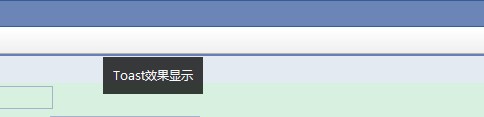
new Toast({context:$('body'),message:'Toast效果显示'}).show();效果图:
1 楼 BuN_Ny 2011-12-20
什么是Toast效果。。
2 楼 cheney_love 2011-12-20
BuN_Ny 写道
什么是Toast效果。。
如图
3 楼 BuN_Ny 2011-12-23
cheney_love 写道
BuN_Ny 写道
什么是Toast效果。。
如图
网易邮箱的那个?