如图:
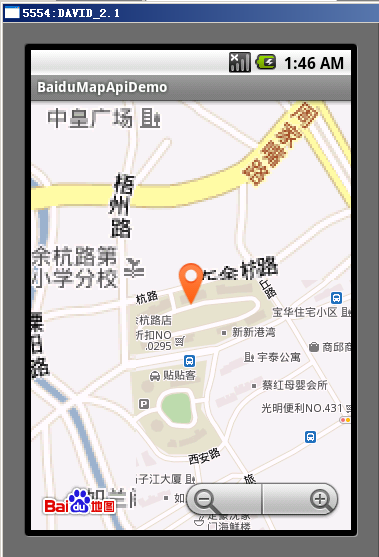
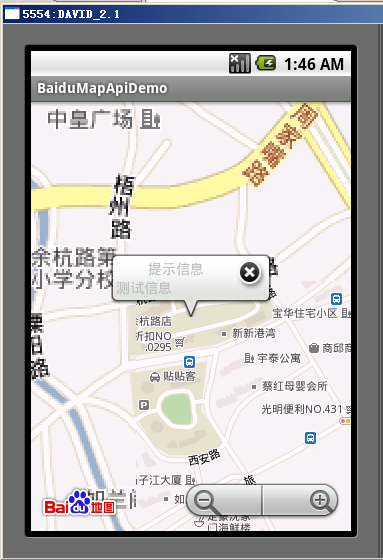
我是在百度的demo上改的主要代码:
package com.baidu.mapapi.demo;import java.util.ArrayList;import java.util.List;import android.content.Context;import android.content.Intent;import android.graphics.Canvas;import android.graphics.Color;import android.graphics.Paint;import android.graphics.Point;import android.graphics.drawable.Drawable;import android.os.Bundle;import android.view.View;import android.view.ViewGroup.LayoutParams;import android.widget.ImageView;import android.widget.TextView;import android.widget.Toast;import com.baidu.mapapi.BMapManager;import com.baidu.mapapi.GeoPoint;import com.baidu.mapapi.ItemizedOverlay;import com.baidu.mapapi.MapActivity;import com.baidu.mapapi.MapView;import com.baidu.mapapi.OverlayItem;import com.baidu.mapapi.Projection;public class ItemizedOverlayDemo extends MapActivity { static MapView mMapView = null; public View popView; private double mLat1 = 31.257277; // point1纬度 private double mLon1 = 121.501347; // point1经度 public void onCreate(Bundle savedInstanceState) { super.onCreate(savedInstanceState); setContentView(R.layout.mapviewdemo); String temp = "测试信息"; BMapApiDemoApp app = (BMapApiDemoApp)this.getApplication(); if (app.mBMapMan == null) { app.mBMapMan = new BMapManager(getApplication()); app.mBMapMan.init(app.mStrKey, new BMapApiDemoApp.MyGeneralListener()); } app.mBMapMan.start(); // 如果使用地图SDK,请初始化地图Activity super.initMapActivity(app.mBMapMan); mMapView = (MapView)findViewById(R.id.bmapView); mMapView.setBuiltInZoomControls(true); //设置在缩放动画过程中也显示overlay,默认为不绘制 mMapView.setDrawOverlayWhenZooming(true); GeoPoint point =new GeoPoint((int)(mLat1*1e6), (int)(mLon1*1e6)); mMapView.getController().setCenter(point); mMapView.getController().setZoom(17); // 添加ItemizedOverlay Drawable marker = getResources().getDrawable(R.drawable.iconmarka); //得到需要标在地图上的资源 marker.setBounds(0, 0, marker.getIntrinsicWidth(), marker .getIntrinsicHeight()); //为maker定义位置和边界 mMapView.getOverlays().add(new OverItemT(marker, this,mLat1,mLon1,temp)); //添加ItemizedOverlay实例到mMapView initPopview(); } @Override protected void onPause() { BMapApiDemoApp app = (BMapApiDemoApp)this.getApplication(); app.mBMapMan.stop(); super.onPause(); } @Override protected void onResume() { BMapApiDemoApp app = (BMapApiDemoApp)this.getApplication(); app.mBMapMan.start(); super.onResume(); } @Override protected boolean isRouteDisplayed() { // TODO Auto-generated method stub return false; } private void initPopview(){ popView = super.getLayoutInflater().inflate(R.layout.popview, null); mMapView.addView( popView, new MapView.LayoutParams(MapView.LayoutParams.WRAP_CONTENT, MapView.LayoutParams.WRAP_CONTENT, null, MapView.LayoutParams.TOP_LEFT)); //由于气泡的尾巴是在下边居中的,因此要设置成MapView.LayoutParams.BOTTOM_CENTER. //这里没有给GeoPoint,在onFocusChangeListener中设置// views.add(popView); popView.setVisibility(View.GONE); }}class OverItemT extends ItemizedOverlay<OverlayItem> { private List<OverlayItem> mGeoList = new ArrayList<OverlayItem>(); private Drawable marker; private ItemizedOverlayDemo mContext; private TextView textView1; private TextView textView2; public OverItemT(Drawable marker, Context context, double mLat1,double mLon1,String mer_name) { super(boundCenterBottom(marker)); this.marker = marker; this.mContext = (ItemizedOverlayDemo)context; // 用给定的经纬度构造GeoPoint,单位是微度 (度 * 1E6) GeoPoint p1 = new GeoPoint((int) (mLat1 * 1E6), (int) (mLon1 * 1E6)); // 构造OverlayItem的三个参数依次为:item的位置,标题文本,文字片段 mGeoList.add(new OverlayItem(p1, "", mer_name)); populate(); //createItem(int)方法构造item。一旦有了数据,在调用其它方法前,首先调用这个方法 } @Override public void draw(Canvas canvas, MapView mapView, boolean shadow) { // Projection接口用于屏幕像素坐标和经纬度坐标之间的变换 Projection projection = mapView.getProjection(); for (int index = size() - 1; index >= 0; index--) { // 遍历mGeoList OverlayItem overLayItem = getItem(index); // 得到给定索引的item String title = overLayItem.getTitle(); // 把经纬度变换到相对于MapView左上角的屏幕像素坐标 Point point = projection.toPixels(overLayItem.getPoint(), null); // 可在此处添加您的绘制代码 Paint paintText = new Paint(); paintText.setColor(Color.BLUE); paintText.setTextSize(15); canvas.drawText(title, point.x-30, point.y, paintText); // 绘制文本 } super.draw(canvas, mapView, shadow); //调整一个drawable边界,使得(0,0)是这个drawable底部最后一行中心的一个像素 boundCenterBottom(marker); } @Override protected OverlayItem createItem(int i) { // TODO Auto-generated method stub return mGeoList.get(i); } @Override public int size() { // TODO Auto-generated method stub return mGeoList.size(); } // 处理当点击事件 protected boolean onTap(int i) { setFocus(mGeoList.get(i)); MapView.LayoutParams geoLP = (MapView.LayoutParams) mContext.popView.getLayoutParams(); GeoPoint pt = mGeoList.get(i).getPoint(); mContext.mMapView.updateViewLayout(mContext.popView,new MapView.LayoutParams(LayoutParams.WRAP_CONTENT, LayoutParams.WRAP_CONTENT, pt, MapView.LayoutParams.BOTTOM_CENTER)); mContext.popView.setVisibility(View.VISIBLE); textView1 = (TextView) mContext.findViewById(R.id.map_bubbleTitle); textView2 = (TextView) mContext.findViewById(R.id.map_bubbleText); textView1.setText("提示信息"); textView2.setText(mGeoList.get(i).getSnippet()); ImageView imageView = (ImageView) mContext.findViewById(R.id.map_bubbleImage); imageView.setOnClickListener(new View.OnClickListener(){ public void onClick(View v) { mContext.popView.setVisibility(View.GONE); } }); return true; } @Override public boolean onTap(GeoPoint arg0, MapView arg1) { // TODO Auto-generated method stub return super.onTap(arg0, arg1); }}整个包在附件中:
记得自己申请key,好像这个弹出框也可以在谷歌地图上用;