SimpleCursorAdapter是一个简单的adapter,提供数据库Cursor到TextView的映射。
在实际开发过程中,除了TextView外,往往还需要依赖于数据库数据的其它的组件。
通过继承SimpleCursorAdapter,重写bindView(View view, Context context, Cursor cursor)来实现
?
示例代码
Main.java
?
package dyingbleed.iteye;import android.app.ListActivity;import android.content.Context;import android.database.Cursor;import android.database.sqlite.SQLiteDatabase;import android.os.Bundle;import android.view.View;import android.widget.Button;import android.widget.SimpleCursorAdapter;public class Main extends ListActivity { private MySQLiteOpenHelper sqlite; private MyListViewAdapter adapter; @Override public void onCreate(Bundle savedInstanceState) { super.onCreate(savedInstanceState); setContentView(R.layout.main); sqlite = new MySQLiteOpenHelper(this); initListView(); } @Override protected void onDestroy() { sqlite.close(); super.onDestroy(); } private void initListView() { SQLiteDatabase readableDB = sqlite.getReadableDatabase(); Cursor cursor = readableDB.query(MySQLiteOpenHelper.TABLE_NAME, null, null, null, null, null, null); adapter = new MyListViewAdapter(this, cursor); setListAdapter(adapter); } private class MyListViewAdapter extends SimpleCursorAdapter { public MyListViewAdapter(Context context, Cursor c) { super(context, R.layout.item, c, new String[] {MySQLiteOpenHelper.VOLUMN_NAME}, new int[] {R.id.item_NameTextView}); } @Override public void bindView(View view, Context context, Cursor cursor) { super.bindView(view, context, cursor); final int id = cursor.getInt(cursor.getColumnIndex(MySQLiteOpenHelper.VOLUMN_ID)); Button delete = (Button) view.findViewById(R.id.item_DeleteButton); delete.setOnClickListener(new View.OnClickListener() { @Override public void onClick(View v) { SQLiteDatabase writableDB = sqlite.getWritableDatabase(); writableDB.delete(MySQLiteOpenHelper.TABLE_NAME , MySQLiteOpenHelper.VOLUMN_ID+"=?" //添加"=?" , new String[] {String.valueOf(id)}); writableDB.close(); initListView(); } }); } }}?
MySQLiteOpenHelper.java
package dyingbleed.iteye;import android.content.Context;import android.database.sqlite.SQLiteDatabase;import android.database.sqlite.SQLiteOpenHelper;public class MySQLiteOpenHelper extends SQLiteOpenHelper { public static final String DATABASE_NAME = "dyingbleed"; public static final String TABLE_NAME = "list"; public static final String VOLUMN_ID = "_id"; public static final String VOLUMN_NAME = "name"; public MySQLiteOpenHelper(Context context) { super(context, TABLE_NAME, null, 1); // TODO Auto-generated constructor stub } @Override public void onCreate(SQLiteDatabase db) { String sql = "CREATE TABLE IF NOT EXISTS " +TABLE_NAME +"(" +VOLUMN_ID +" INTEGER PRIMARY KEY AUTOINCREMENT," +VOLUMN_NAME +" TEXT UNIQUE)"; db.execSQL(sql); } @Override public void onUpgrade(SQLiteDatabase db, int oldVersion, int newVersion) { // TODO Auto-generated method stub }}??
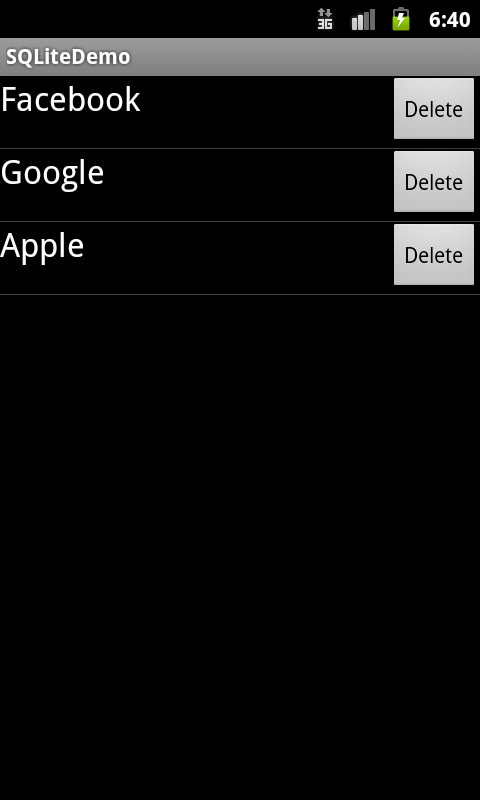
运行截图
1 楼 sword_java 2012-04-16
实现的 太片面了, 只有 delete操作, 如果点击Item项呢? 还有, 不能每次点击new一个listener, 应该继承下