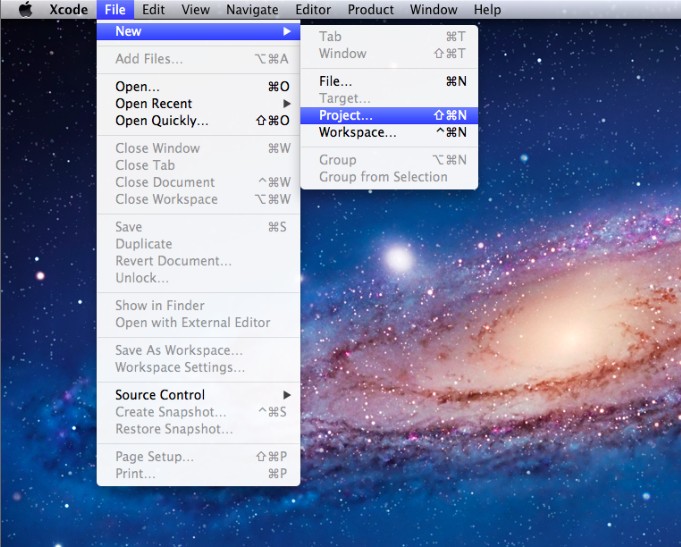
1.单击菜单File->New->Proget.....新建一个项目:
???
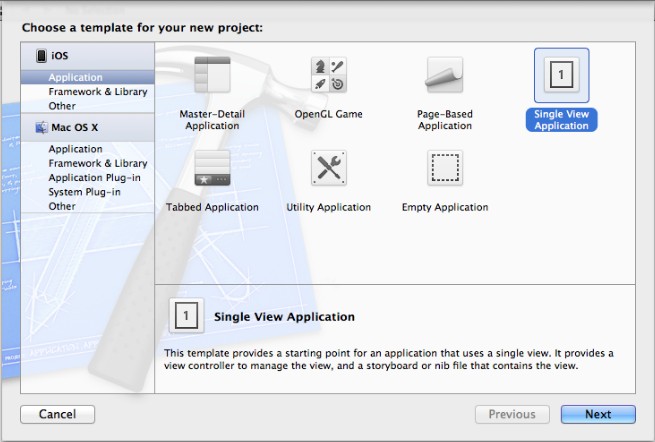
?? 2.选择Single View Application模板,单击Next:
???
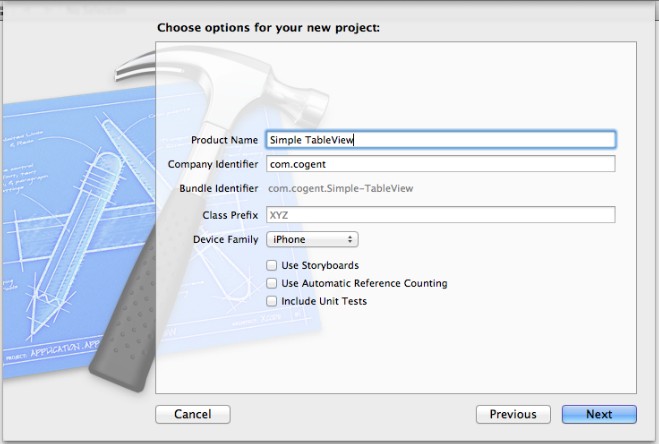
???3.将项目命名为Simple Table,单击Next->Create,新建项目:
???
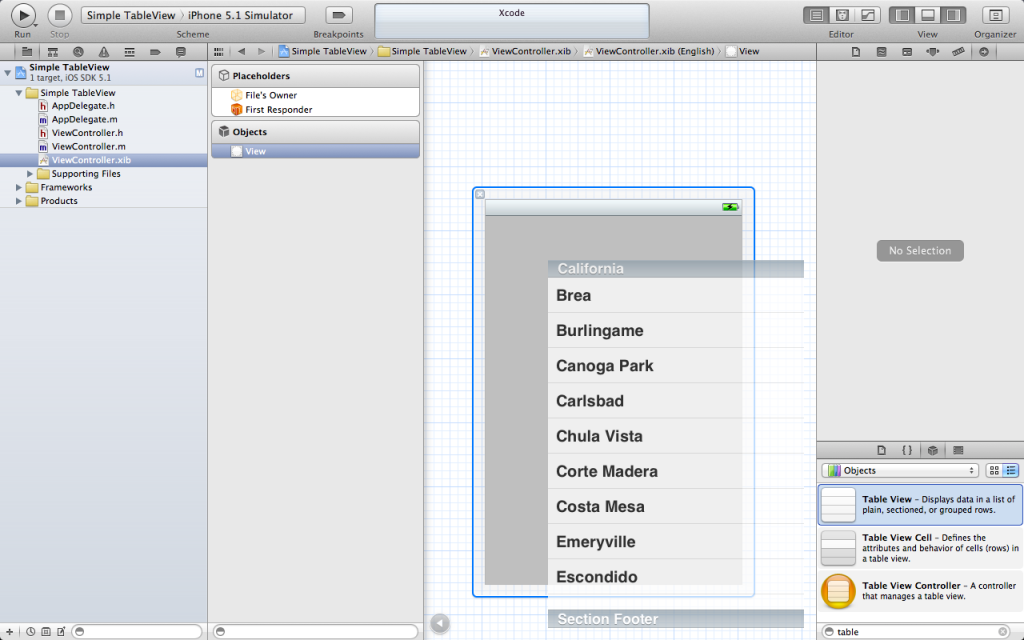
???4.单击ViewController.xib文件,在View视图上添加控件Table View:
?? 
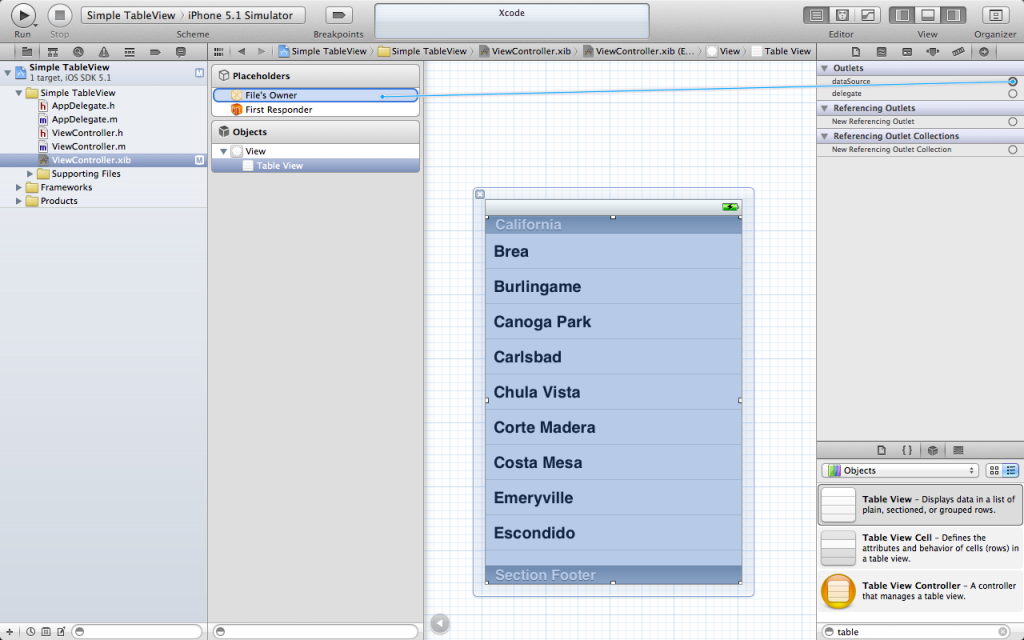
? 5.为控件Table View添加数据、方法委托:
?? 
?
? 6.单击ViewController.h头文件,为ViewController添加数据成员:
- #import?<UIKit/UIKit.h>??
- ??
- @interface?ViewController?:?UIViewController<UITableViewDelegate,UITableViewDataSource>??
- {??
- ???NSArray?*list;??
- }??
- @property(nonatomic,retain)NSArray?*list;??
- ??
- @end??
? 7.单击ViewController.m文件,为ViewController添加数据和协议方法:
- #import?"ViewController.h"??
- ??
- @interface?ViewController?()??
- ??
- @end??
- ??
- @implementation?ViewController??
- @synthesize?list;??
- ??
- -?(void)viewDidLoad??
- {??
- ????[super?viewDidLoad];??
- ????//?Do?any?additional?setup?after?loading?the?view,?typically?from?a?nib.??
- ????NSArray?*array?=?[[NSArray?alloc]initWithObjects:@"广东",@"湖南",@"北京",@"上海",@"香港",@"澳门",?nil];??
- ????self.list?=?array;??
- ????[array?release];??
- }??
- ??
- -?(void)viewDidUnload??
- {??
- ????[super?viewDidUnload];??
- ????//?Release?any?retained?subviews?of?the?main?view.??
- ????self.list?=?nil;??
- }??
- ??
- -?(BOOL)shouldAutorotateToInterfaceOrientation:(UIInterfaceOrientation)interfaceOrientation??
- {??
- ????return?(interfaceOrientation?!=?UIInterfaceOrientationPortraitUpsideDown);??
- }??
- ??
- -(void)dealloc??
- {??
- ????[super?dealloc];??
- ????[list?release];??
- }??
- ??
- #pragma?mark?-??
- #pragma?mark?Table?Data?Source?Methods??
- ??
- -(NSInteger)tableView:(UITableView?*)tableView?numberOfRowsInSection:(NSInteger)section??
- {??
- ????return?[list?count];??
- }??
- ??
- -(UITableViewCell?*)tableView:(UITableView?*)tableView?cellForRowAtIndexPath:(NSIndexPath?*)indexPath??
- {??
- ????static?NSString?*identfier=@"placetable";??
- ????UITableViewCell?*cell?=?[tableView?dequeueReusableCellWithIdentifier:identfier];??
- ????if(cell==nil)??
- ????{??
- ????????cell?=?[[UITableViewCell?alloc]initWithStyle:UITableViewCellStyleDefault?reuseIdentifier:identfier];??
- ????}??
- ????NSInteger?row?=?[indexPath?row];??
- ????cell.textLabel.text?=?[list?objectAtIndex:row];??
- ????return?cell;??
- }??
- ??
- -(void)tableView:(UITableView?*)tableView?didSelectRowAtIndexPath:(NSIndexPath?*)indexPath??
- {??
- ????NSInteger?row?=?[indexPath?row];??
- ????NSString?*message?=?[list?objectAtIndex:row];??
- ????UIAlertView?*alert?=?[[UIAlertView?alloc]initWithTitle:@" 你选择:"?message:message?delegate:self?cancelButtonTitle:@"确 定"?otherButtonTitles:nil];??
- ????[alert?show];??
- ????[alert?release];??
- }??
- ??
- @end??
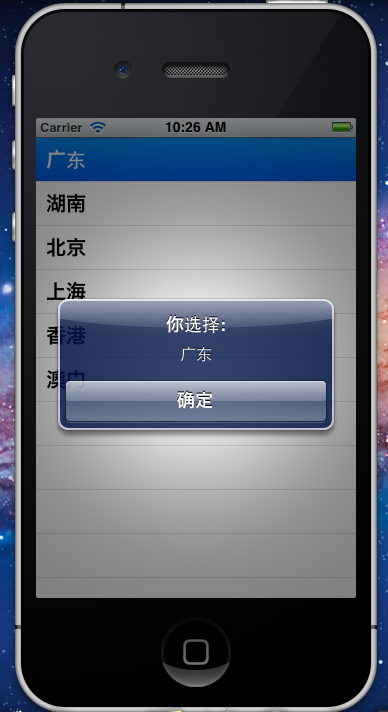
? 8.现在可以单击运行按钮,测试程序,单击其中的选项“广东”,效果如下:
??