1. 打开xcode,依次点击菜单栏的File -> New Project -> Application -> View-based Application
?
2. Choose -> 输入project名称?SimpleTableView -> Save
?
3. 双击Resources组(这里不叫文件夹,叫Group组)展开该组。
?
4. 双击?SimpleTableViewViewController.xib,按下shift + command + L快捷键,显示出来了Library面板。
?
5. 当按下了shift + command + L时,焦点会在Library面板底部的搜索框内,直接输入Table, ?
?
?? ?把Table View拖到刚才打开的View窗口中,然后按下command + 2快捷键,
?
?? ?把 dataSource、delegate拖到xib窗口中的 File's Owner中,按下command + S保存。
?
6. 然后双击Classes组,单击 SimpleTableViewViewController.h 文件,
?
?? ?@interface?SimpleTableViewViewController : UIViewController {
?
?? ?把上面这行改成下面这行
@interface SimpleTableViewViewController : UIViewController<UITableViewDataSource, UITableViewDelegate> {??然后加入成员变量m_data,是TableView待会要显示的数据。
?
?? ?代码如下:
@interface SimpleTableViewViewController : UIViewController<UITableViewDataSource, UITableViewDelegate> { NSArray *m_data;}@property (nonatomic, retain) NSArray *m_data;@end?7. 单击?SimpleTableViewViewController.m 文件
?
?? ?在?@implementation?SimpleTableViewViewController 下面加如下一行代码
?
@synthesize m_data;
?8. 把?SimpleTableViewViewController.m 文件中的?viewDidLoad 函数的注释去掉并加入以下代码
// Implement viewDidLoad to do additional setup after loading the view, typically from a nib.- (void)viewDidLoad { NSArray *arr = [[NSArray alloc] initWithObjects: @"桔子", @"雪梨", @"毛桃", @"李子", @"荔枝", @"柚子", @"芒果", @"菠萝", @"草莓", @"西瓜", nil]; self.m_data = arr; [arr release]; [super viewDidLoad];}?9. 最后在?SimpleTableViewViewController.m 文件最下面 @end 之前,加入以下代码
#pragma mark -#pragma mark Table View Data Source Methods- (NSInteger)tableView:(UITableView *)tableView numberOfRowsInSection:(NSInteger)section{ return [m_data count];}- (UITableViewCell *)tableView:(UITableView *)tableView cellForRowAtIndexPath:(NSIndexPath *)indexPath{ static NSString *TableViewDynamicLoadIdentifier = @"TableViewDynamicLoadIdentifier"; UITableViewCell *pCell = [tableView dequeueReusableCellWithIdentifier:TableViewDynamicLoadIdentifier]; if (pCell == nil) { pCell = [[[UITableViewCell alloc] initWithStyle:UITableViewCellStyleDefault reuseIdentifier:TableViewDynamicLoadIdentifier] autorelease]; } NSInteger nRow = [indexPath row]; pCell.textLabel.text = [m_data objectAtIndex:nRow]; return pCell;}?10. 编译并运行后的效果如下图如示: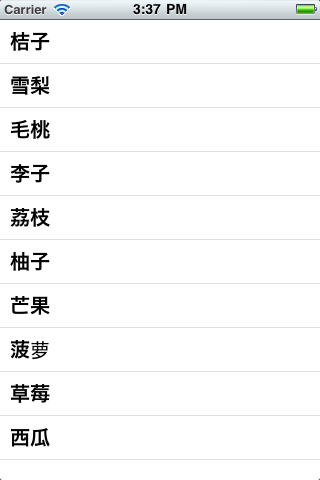
?